
In the realm of esports and competitive gaming setup, having the right setup is paramount. A gaming setup refers to the environment and equipment used by players during their gaming sessions. This concept extends beyond just having a high-performance computer or console; it encompasses all elements that contribute to an optimal gaming experience, including peripherals, ergonomics, and the overall physical arrangement of the gaming area. For competitive players, the ideal gaming setup plays a crucial role in enhancing performance. Comfort has a significant impact, as lengthy gaming sessions require players to maintain focus and physical endurance. An ergonomic chair, adjustable desk, and appropriately positioned monitors can significantly reduce the risk of strain and increase player stamina. Additionally, maintaining a comfortable temperature and adequate lighting can further facilitate prolonged engagement without fatigue.
Efficiency is another critical aspect of a successful gaming setup. Competitive gaming often involves quick reflexes and split-second decision-making. The quality of peripherals such as keyboards, mice, and headsets can greatly influence a player’s ability to execute their strategy effectively. High-quality, responsive gear can minimize input delay and ensure that commands are communicated to the game instantaneously. This immediacy can be the difference between victory and defeat in competitive matches.
Moreover, the psychological influence of a well-organized gaming environment should not be overlooked. A clutter-free and aesthetically pleasing workspace can contribute positively to a player’s mindset and focus. Taking the time to set up a personalized gaming area can foster both comfort and motivation, ultimately leading to improved gameplay. Therefore, understanding the significance of a well-thought-out setup is beneficial for any player aspiring to excel in competitive gaming.
Essential Components of a Gaming Setup
When creating an optimal gaming setup, various hardware components play a crucial role in enhancing overall gaming performance. Among these components, one of the primary considerations is the choice between a gaming PC and a console. Each option has its unique advantages; gaming PCs generally offer superior performance and customization, while consoles provide ease of use and access to exclusive titles.
The graphics processing unit (GPU) is arguably one of the most critical components for any gaming setup. A powerful GPU ensures high frame rates and better visual fidelity, which can significantly impact gameplay experience, especially in fast-paced competitive games. Players often need a GPU that supports advanced rendering techniques such as ray tracing and high-resolution textures to stay competitive in the gaming landscape.
Equally, the processor plays a vital role in determining gaming performance. A strong central processing unit (CPU) allows for smooth multitasking and quick load times. In many cases, the performance of the CPU can directly affect game mechanics, including how well a game responds to player inputs. Therefore, selecting a high-performance CPU is essential for gamers who demand responsiveness and speed.
Memory, or RAM, is another essential component that contributes to gaming efficiency. A sufficient amount of memory ensures that games run without hiccups, especially during intensive sequences. While 16GB of RAM is often suggested as a standard for most gaming setups, higher amounts can benefit gamers who multitask or run multiple applications simultaneously.
Finally, storage solutions significantly affect gaming setups. Solid-state drives (SSDs) offer faster load times compared to traditional hard disk drives (HDDs), providing players with seamless transitions and quick access to games. As game file sizes increase, having a combination of both an SSD for gaming and an HDD for additional storage can be an optimal strategy for competitive players.
Choosing the Right Monitor
In competitive gaming, the choice of monitor plays a critical role in enhancing the overall gaming experience. The right monitor can significantly impact gameplay, influencing responsiveness and visual clarity. This choice often comes down to three main specifications: refresh rates, resolution, and panel types.
Firstly, refresh rates measure how many frames per second a monitor can display. Higher refresh rates, such as 144Hz or even 240Hz, offer smoother motion during high-paced gaming sessions, providing a competitive edge over others using standard 60Hz monitors. For competitive gamers who rely on fast reflexes, a higher refresh rate can be crucial in gaining quicker response times and improving gameplay fluidity.
Next, resolution determines the clarity of the images displayed. Common resolutions include 1080p (Full HD), 1440p (Quad HD), and 4K. While a 4K resolution provides stunning visuals, it may not be practical for competitive gaming due to the increased demand on graphic cards which could affect frame rates. Most competitive players opt for 1080p or 1440p, balancing visual clarity with performance.
Panel types further influence the gaming experience, with the primary types being IPS (In-Plane Switching), TN (Twisted Nematic), and VA (Vertical Alignment). IPS panels offer superior color accuracy and wider viewing angles, making them ideal for games with vibrant graphics. However, TN panels tend to have faster response times, which may appeal to competitive players focused on speed. VA panels provide deeper blacks and higher contrast ratios, which enhance immersion but typically feature slower response times in comparison.
In conclusion, when selecting a monitor for competitive gaming, it is essential for players to assess their priorities based on refresh rate, resolution, and panel type. Each aspect plays a significant role in gameplay, and understanding these differences can assist in creating an optimal gaming setup.
Ergonomics and Comfort
Creating an effective gaming environment goes beyond advanced hardware and cutting-edge technology. One crucial aspect that often gets overlooked is the ergonomic design of the gaming setup. An ergonomic arrangement significantly impacts comfort and performance, especially during prolonged gaming sessions. The proper choice of chairs, desks, and room layout can help players maintain focus while minimizing physical strain.
When selecting a gaming chair, it is essential to look for adjustable features such as height, lumbar support, and armrests. A chair that conforms to the natural curve of the spine promotes better posture, which is important for reducing fatigue and discomfort. Ideally, gamers should invest in a chair that allows for adjustments to suit their body type, ensuring that they can remain comfortable and alert throughout long periods of gameplay.
Equally important is the gaming desk. It should be at a height that allows for natural resting of the forearms while typing or using a controller. This detail helps to alleviate strain on the wrist and prevents ongoing discomfort. Additionally, a desk with enough surface area is beneficial as it allows the gamer to organize peripherals without feeling cramped. An ideal setup also considers the distance of the monitor, which should be positioned at eye level to avoid neck strain while maintaining visibility of the screen.
The layout of the gaming room should foster an uncluttered environment, allowing for optimal movement and comfort. Ensuring that cables are managed properly can not only make the space look organized but also enhance safety. Gamers should also guard against glare from windows by arranging the gaming area purposefully, which can mitigate distractions and improve focus.
Peripherals that Make a Difference
In the realm of competitive gaming, the choice of peripherals can significantly impact both performance and comfort. Key components that aspiring professional gamers should consider include keyboards, mice, and headsets. Each of these devices plays a crucial role in a player’s gaming experience and overall effectiveness during gameplay.
Regarding keyboards, mechanical options are often favored by gamers due to their responsiveness and tactile feedback. Professional players typically look for keyboards with customizable RGB lighting, programmable macros, and robust durability to withstand intense gaming sessions. The polling rate is also an essential feature; a higher polling rate allows for more precise tracking and quicker response times, which can be crucial in fast-paced gaming scenarios.
Similarly, the choice of a gaming mouse is integral to a player’s setup. Professional gamers prioritize features such as adjustable DPI settings, which enable them to switch sensitivity on the fly to match various in-game situations. Another critical aspect is the weight and design of the mouse; ergonomic shapes that reduce strain and fatigue are vital for long hours of play. The presence of programmable buttons can also enhance gameplay by allowing quick access to essential in-game functions.
Furthermore, headsets play an equally important role in competitive gaming. They not only provide high-quality audio to immerse players in gameplay but also offer clear communication capabilities for team coordination. A good gaming headset should have features such as surround sound for spatial awareness and a comfortable fit for prolonged usage. Noise cancellation is another desirable feature, allowing players to maintain focus in high-stakes environments.
Choosing the right peripherals is an essential part of preparing for competitive gaming. Each component impacts the player’s ability to perform at their best while ensuring comfort during long gaming sessions. Investing in quality peripherals tailored to individual preferences can make a significant difference in one’s gaming experience and performance.
Lighting and Aesthetics
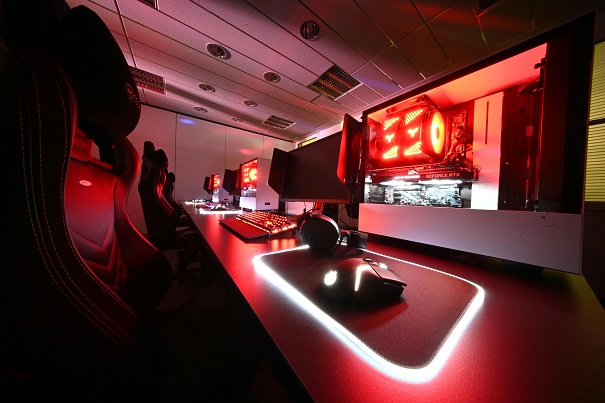
In modern gaming setups, the role of lighting has transcended mere functionality; it has become an integral part of the gaming experience itself. Lighting not only enhances visibility in dimly lit environments but also contributes significantly to the overall aesthetics of a gaming space. For competitive players, creating an immersive environment with the right lighting can heighten focus and concentration during intense gameplay.
RGB lighting, in particular, has surged in popularity among gamers. This versatile lighting technology allows users to customize colors and effects in real-time, which can synchronize with in-game actions. The ability to create dynamic lighting effects can enhance emotional response and immersion, making each gaming session feel more engaging. Moreover, RGB lighting setups can be adjustable to suit various preferences, from subtle ambient lighting that promotes a calming atmosphere, to bright, pulsating colors that reflect high-intensity moments.
In addition to lighting, aesthetic organization plays a practical role in maintaining an effective gaming space. A well-organized setup allows for optimal accessibility of gaming peripherals, reducing distractions and enhancing overall concentration. Personal branding within the gaming space can also be achieved through careful selection of colors, themes, and lighting choices. By curating a unique aesthetic, gamers not only reflect their personalities but can also create a sense of belonging within the broader gaming community.
Ultimately, the combination of effective lighting and thoughtful organization contributes to an environment where competitive players can thrive, fostering creativity, focus, and an all-encompassing gaming experience.
Cable Management Tips
Effective cable management is an essential component of any gaming setup, especially for competitive players who require an organized environment to optimize their performance. Proper organization of cables not only enhances the overall aesthetics of the gaming area but also significantly improves functionality. A cluttered workspace can distract players, making it crucial to implement strategies that keep cables tidy and manageable.
One of the primary steps to successful cable management is to gather all cables in one place before setting up your gaming station. This involves organizing cables by type—such as power cables, HDMI cables, and USB cords—to facilitate easy identification. Use cable ties or Velcro straps to bundle cables together, which can minimize tangling and make your setup neater. Additionally, consider using a cable management box to conceal excess cables and power strips, creating a clean and streamlined appearance.
Another effective method is to utilize cable clips or adhesive hooks to route cables along edges of desks or walls. This solution keeps cables off the floor, significantly reducing tripping hazards and maintaining a clean look. For those looking to take it a step further, consider investing in a cable sleeve that allows multiple cords to run together inside a single protective sheath. This not only reduces visual clutter but also provides a unified and professional look to your gaming area.
Finally, regularly assessing your cable management system is vital. As new equipment is added or upgrades are made, cables can accumulate quickly. Take the time to maintain your setup every few months, ensuring that all cables remain organized and functional. By adhering to these practical tips, competitive players can foster a gaming environment that enhances focus and performance, contributing to a more enjoyable and effective gaming experience.
Customizing Your Setup for Gaming Discipline
Customization plays a critical role in enhancing the performance of competitive players across various gaming genres such as first-person shooters (FPS), role-playing games (RPG), and multiplayer online battle arenas (MOBA). Each of these genres demands a unique gaming setup that can significantly affect gameplay styles and outcomes.
For FPS games, where precision and reaction time are paramount, players often gravitate towards setups that prioritize high refresh rate monitors and low-latency peripherals such as mechanical keyboards and ergonomic gaming mice. For example, setups favored by professional FPS gamers often include a 240Hz monitor, providing a competitive edge by ensuring smoother gameplay and clearer visuals. Players might also use adjustable mouse sensitivity settings to tailor their aim, alongside a mouse pad carefully selected for speed or control.
In the RPG community, customization leans towards immersion and comfort. A setup might incorporate a large, high-resolution display to enjoy expansive landscapes and detailed graphics. Gaming chairs designed for prolonged periods of use, combined with a desktop setup featuring macro-enabled keyboards can enhance the storytelling interaction, allowing quick access to game controls. Many successful RPG players also utilize high-quality headsets to fully experience the audio elements that are crucial in these narrative-driven games.
MOBA games typically demand rapid decision-making and team coordination. Players often configure their setups to prioritize communication tools, such as premium headsets with clear audio quality, and forge alliances through voice chat. Dual monitor setups are not uncommon as they allow players to monitor the game and chat channels simultaneously. Furthermore, customized keybindings enable quick access to essential abilities and commands, enhancing overall responsiveness.
In summary, understanding the game genre and adjusting setups accordingly not only improves performance but also supports the player’s unique gaming style, ultimately leading to enhanced competitive success.
Conclusion and Final Thoughts
In this blog post, we have explored the essential components that contribute to the best gaming setups for competitive players. A well-optimized gaming experience is not solely reliant on high-end hardware; it also encompasses ergonomic design, effective peripheral selection, and an organized workspace. These elements work in unison to create an environment conducive to peak performance and enjoyment.
First and foremost, hardware selection plays a critical role in competitive gaming. High-resolution monitors, powerful CPUs, and graphics cards ensure smooth gameplay and optimal visual clarity, which can make a significant difference during crucial gaming moments. Furthermore, investing in quality peripherals such as mechanical keyboards and precision mice can enhance reaction times and in-game accuracy, providing players a competitive edge.
Additionally, the importance of an ergonomic gaming chair cannot be overstated. Comfort is paramount during long gaming sessions. A high-quality chair can reduce physical strain and fatigue, allowing players to maintain focus and performance levels throughout intense matches. A well-designed desk should also accommodate the necessary space for all gaming devices, fostering an organized and clutter-free setup.
Lighting and aesthetic décor contribute greatly to the immersive gaming experience. Ambient lighting can enhance focus and evoke the right mood, while personalized touches reflect the player’s style and passion for gaming. All these elements combined contribute not just to performance but to an overall enjoyable gaming atmosphere.
In conclusion, creating the best gaming setup for competitive players requires a thoughtful approach to hardware, peripherals, ergonomics, and personalization. By investing in a tailored configuration that addresses these vital aspects, gamers can significantly enhance their experience and performance in competitive play.